Consolidated Taxonomy Panel
Collapses several of a post type's taxonomies into one sidebar panel of chip fields, instead of one collapsible panel per taxonomy.
Seven taxonomies on a post type means seven panels. The document sidebar becomes a scroll, and the fields an editor actually uses are below the fold.
Which taxonomies share the panel is chosen in the editor, per post type, by an administrator looking at the sidebar they are fixing.
Before and after, on the same post type, as an administrator sees it. Nine taxonomy panels become three, because six were ticked into the panel — Categories, Tags and Keywords were left alone, so they keep theirs:
| Off | On |
|---|---|
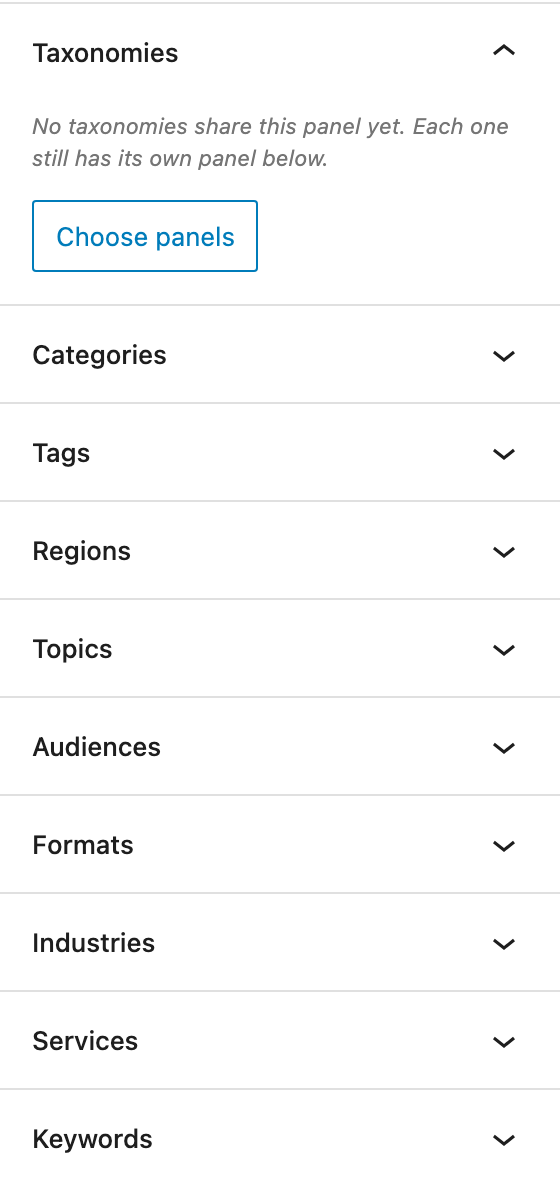 | 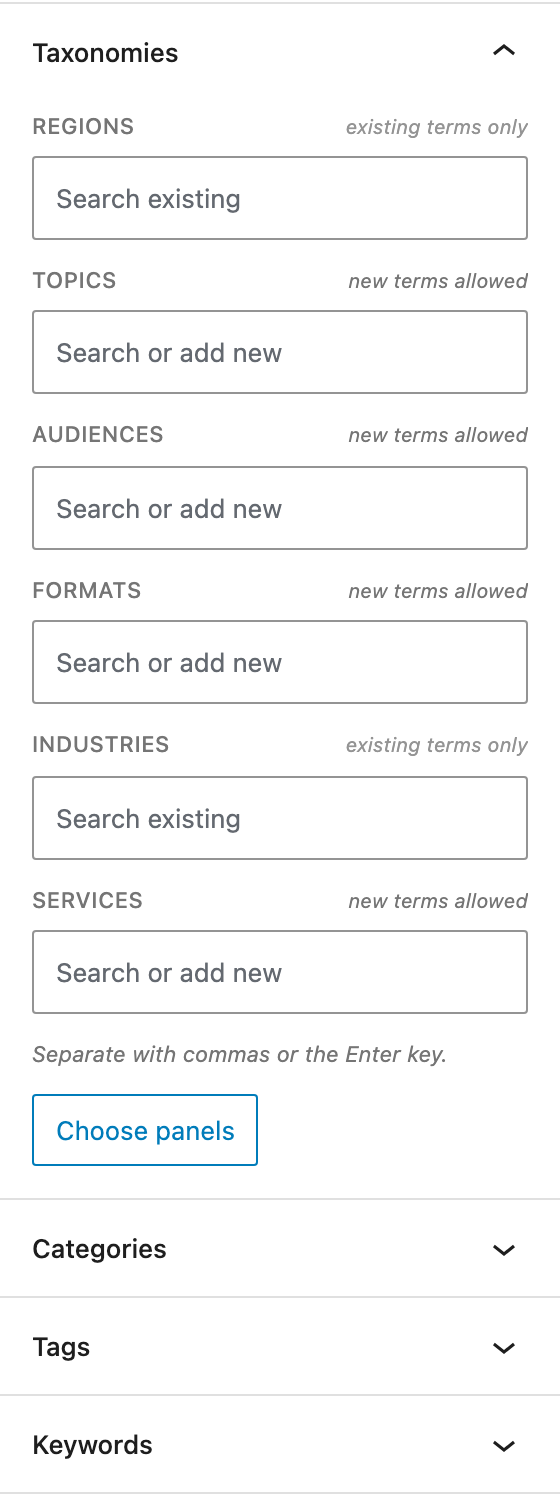 |
The empty Taxonomies panel in the "off" column is how the feature is found: administrators always see it, everyone else only sees it once it holds something.
How a taxonomy joins the panel
In the editor, on the post type whose sidebar you are looking at. Open any post of that type. The Taxonomies panel is in the document sidebar; an administrator sees it even when it is empty, with a Choose panels button.
Tick a taxonomy and its separate panel disappears and its chip field appears, immediately. Untick it and the panel comes straight back. Nothing is saved until Save — Cancel puts the sidebar back the way it was.
The picker is in two parts. In this panel lists what is consolidated, in the order the panel shows it; Keeping their own panel lists everything else. Each row is labelled exactly as its own panel is labelled in the sidebar, with its slug underneath, so a line in the list and a panel on screen are unambiguously the same thing. Tick all / Untick all is there for the crowded post types this feature exists for.
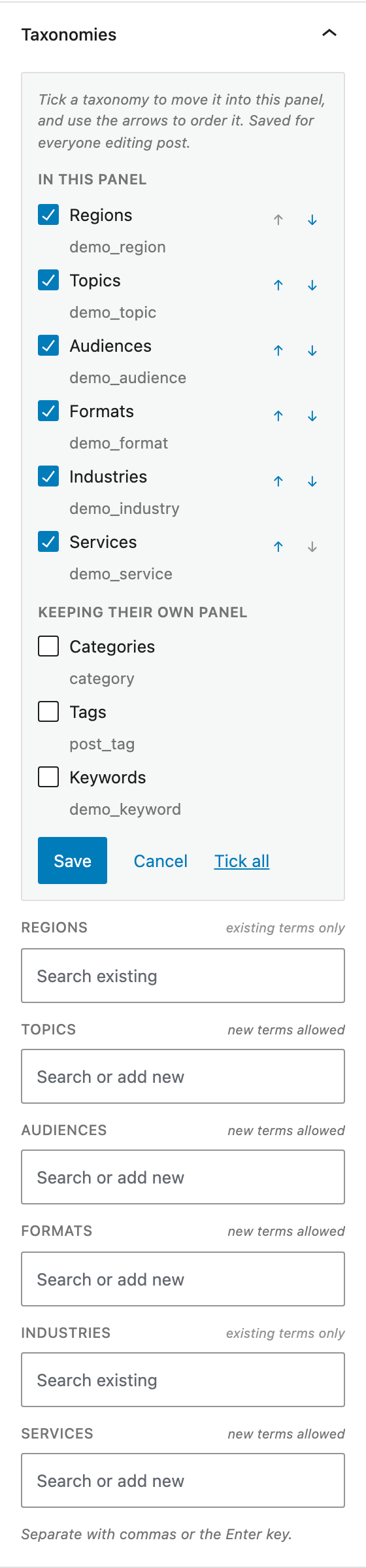
The fields below the picker update as boxes are ticked and rows are moved, so the panel being built is visible while it is being chosen.
Ordering the fields
The ↑ and ↓ buttons on each row in In this panel move that taxonomy up or down. The arrows at the two ends are disabled rather than hidden, so the rows never shift under the pointer, and each move is announced to screen readers ("Pet Statuses moved to position 3 of 4").
They are buttons rather than a drag handle on purpose. Dragging needs a keyboard path built alongside it to be usable at all, and at the five-to-twelve rows this picker is for, the buttons are quicker than either.
Ticking a taxonomy adds it to the end of the panel, never into its registration slot — re-sorting on every tick would silently undo an order you had just arranged.
The choice is per post type
pet-type can be on both pet and stray. Seven taxonomies on pet is a
sidebar worth consolidating; the two on stray are not. So the setting is keyed
by post type, and ticking a taxonomy on one leaves the other alone.
That is also why the setting is not on the taxonomy: a taxonomy has one registration and cannot hold two different answers.
It is a site setting, not a preference
One save changes the sidebar for everyone editing that post type. It is
stored in the yoko_taxonomy_panel option, not in user meta, and needs
manage_options — filterable:
add_filter( 'yoko_taxonomy_panel_capability', fn() => 'edit_others_posts' );
Everyone else just sees the result: no picker, no button, and the panel only appears once something is in it.
Which taxonomies are offered
Every taxonomy attached to the post type with both show_ui and show_in_rest.
A taxonomy without show_in_rest is not offered, because the block editor cannot
edit it at all — consolidating it would hide it rather than move it.
A panel that has never been ordered by hand shows its fields in the order the taxonomies are attached to the post type, which is the order their separate panels were already in. To move the consolidated panel itself among the sidebar's other panels, see Sidebar Panel Order.
What the panel does
| Taxonomy | Field | Adding new terms |
|---|---|---|
| Flat (tags-like) | Chip field, search as you type | Yes, if you can create terms |
| Hierarchical (categories-like) | Chip field, search as you type | No — assign only |
Hierarchical taxonomies are assign-only on purpose: a term typed into a chip field has no parent, so it would land at the root of the tree, which is almost never what someone meant. Use the taxonomy's own admin screen to add terms with a parent.
Clicking a field before typing lists the whole taxonomy, most-used first. The terms already on the most posts are the ones an editor usually wants, so they are the ones at the top. Terms nobody has used yet are still there, at the end — they just sort last. Typing switches the list to a search.
Every field says which it is. Consolidating taxonomies puts fields that look identical next to each other, so each one is labelled on the right of its title:
| Marker | What typing a new name does |
|---|---|
| new terms allowed | Creates the term and attaches it. |
| existing terms only | Nothing — the field only attaches terms that exist. |
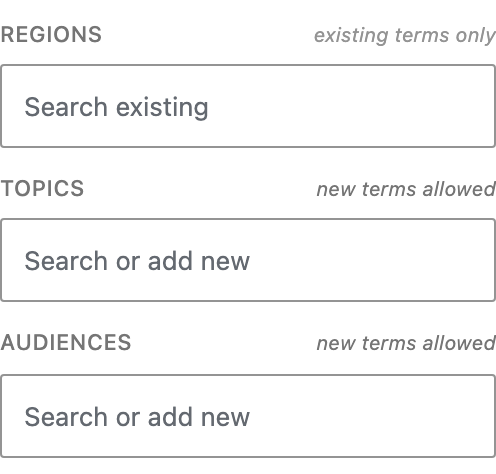
Hover a marker for the reason: a hierarchical taxonomy points at its own admin screen, and a field you lack the capability for says so. If a name is typed into an existing terms only field anyway, the value is dropped and explained — "'Nowhere In Particular' was not added — Regions only accepts existing terms" — rather than quietly disappearing.
Terms whose names collide are qualified by their parent. A hierarchical
taxonomy can hold "Boston" under both "Events" and "Offices"; the chips read
Boston (Events) and Boston (Offices) so it is clear which one is attached. A
name that is unique gets no parenthetical.
What is left alone
- Saving the post. The separate panels are hidden, never unregistered, so the terms travel exactly the path they always did.
- Taxonomies left unticked keep their own panel, next to the consolidated one.
- The same taxonomy on another post type. The choice is per post type.
- The taxonomy's own admin screens. Its
show_uiis not changed, so its menu item, term list, and metaboxes are unaffected. - Everything the panel does not own. The Summary section and classic metaboxes are untouched.
Ordering the panel itself
The consolidated panel is registered as a normal plugin panel, so
Sidebar Panel Order can move it like any other. Its
panel key is title:taxonomies, or title:<your title> if you renamed it.
Renaming the panel
add_filter( 'yoko_taxonomy_panel_title', fn() => 'Classification' );
WP-CLI
The headless equivalent, for a broken site, a scripted rollout, or confirming what the editor is actually reading.
wp yoko taxonomy_panel list
wp yoko taxonomy_panel list --post_type=pet
wp yoko taxonomy_panel add --post_type=pet --taxonomy=pet-type
wp yoko taxonomy_panel remove --post_type=pet --taxonomy=pet-type
wp yoko taxonomy_panel order --post_type=pet --taxonomies=pet-type,altered,pet-age
wp yoko taxonomy_panel reset --post_type=pet --yes
post_type  position  taxonomy    label
pet        1         altered     Animal Altered
pet        2         pet-age     Pet Ages
pet        3         pet-type    Pet Types
add appends and order sets the whole sequence at once — a slug left out of
order is removed from the panel. Both refuse a taxonomy the block editor cannot
edit on that post type, and say which ones it can.
Hooks
| Hook | Purpose |
|---|---|
yoko_taxonomy_panel_capability | Capability required to change the panel. Defaults to manage_options. |
yoko_taxonomy_panel_title | The panel heading. |
How the separate panels are hidden
With CSS, and nothing else. The panel is marked
.is-yoko-taxonomy-duplicate and the editor stylesheet hides it; it stays
mounted and registered.
Two better-looking mechanisms were rejected for the same reason. Setting
visibility.show_ui to false in the /wp/v2/taxonomies response, and calling
removeEditorPanel(), both genuinely remove the panel — and neither can be
undone in the same page load. The picker needs exactly that: tick a box, see
the panel go, change your mind, see it come back. So the panel is hidden rather
than removed.
The consequence worth knowing: a hidden panel is still there, still holding the same terms, still part of what the editor saves. Saving a post is completely unchanged by this feature — whatever is ticked, the terms travel the same path they always did. The cost is that a hidden panel still loads its terms, which is one wasted request per consolidated taxonomy.
Panels are matched to taxonomies by title, using the same labels.menu_name
string the editor puts on the panel. If one refuses to hide, that is where to
look:
// In the editor console.
window.yokoTaxonomyPanel.choices;
document.querySelectorAll( '.components-panel__body-toggle' );
Classic editor and page builders
Classic editor: unaffected. This is a block editor sidebar panel; the classic editor shows each taxonomy's metabox as it always has, and those are already drag-sortable per user.
Beaver Builder: unaffected. Nothing here touches the front end, so the feature is theme- and builder-independent.
Limitations
- A taxonomy without
show_in_restis never offered — the block editor cannot edit it at all, so consolidating it would hide it rather than move it. It keeps its own metabox. - A hidden panel is still mounted, so it still loads its terms: one wasted request per consolidated taxonomy. The price of being able to untick a box and see the panel come back.
- Hierarchy is shown only where names collide. A chip field is a flat list by nature; the tree lives on the taxonomy's admin screen.
- The panel starts collapsed, like other plugin panels. WordPress remembers each user's choice after that.
A test bed
dev/demo-taxonomies.php registers seven taxonomies on post — pre-ticking six
of them in the panel and deliberately leaving one out, so the difference is
visible — and seeds their terms, including a name that exists under two different parents so
the disambiguation can be seen. It is a throwaway; never put it on a client site.
Docker dev environment
./dev.sh up
docker compose -f dev/docker-compose.yml exec wordpress   cp /var/www/html/wp-content/plugins/yoko-core/dev/demo-taxonomies.php      /var/www/html/wp-content/mu-plugins/
WordPress Playground
npm run playground:panel-order
The generated blueprint already includes it, so the printed link opens a site
with the seven taxonomies in place. To use the file on its own instead, paste it
into Plugins → Plugin File Editor, or write it to
/wordpress/wp-content/mu-plugins/demo-taxonomies.php from a Blueprint
writeFile step.
Start the terms over with wp option delete yoko_demo_taxonomies_seeded.
The file also carries commented examples of renaming the panel, opening the picker up to editors, and getting back to the before.
Prefix demo taxonomy slugs. An unprefixed slug can collide with a field the REST
posts controller already owns — format, title, status, type, parent,
template — and WordPress logs "conflicts with an existing property on the REST
API Posts Controller". demo-taxonomies.php prefixes everything for that reason.
Verifying a change
npm run test:js                              # unit tests for the store and term helpers
lib/bin/phpunit --filter TaxonomyPanelTest   # storage, validation, per-post-type isolation
./dev.sh up                                  # plus the test bed above
node scripts/taxonomy-panel-e2e.mjs          # drives the real editor
The end-to-end script checks that the separate panels are hidden, that one chip field exists per consolidated taxonomy in the post type's own order, that a taxonomy left out keeps its own panel, that an assignment survives a save and reload, that a new term can be created on a flat taxonomy but not a hierarchical one, that every field is marked with whether it takes new values, that a dropped value is explained rather than vanishing, and that colliding names are qualified.
The screenshots on this page
They are generated, not taken by hand — documentation images go stale silently. With the dev environment and the test bed up, this rewrites them in place:
npm run docs:taxonomy-panel-shots
Rerun it whenever the panel's UI changes, and commit what falls out. It writes
taxonomy-panel-before, -after, -markers and -picker into
website/docs/admin/img/, each clipped to the sidebar panels at 2× and taken
with the panel configured from scratch through its own REST route — so the
images cannot drift from the behaviour in the same commit.