Content Corral
Content Corral is a workflow system for managing large-scale content creation and editorial processes. It provides a dedicated user role, custom taxonomies, a CSV sitemap importer, and reference management tools.
Activation
Content Corral is automatically available under the Yoko Dashboard > Content Corral menu for Yoko team members. No theme code is required — the plugin bootstraps it on every site.
The feature is disabled by default — an administrator must check Enable Content Corral to activate the subsystems.
Settings Page
Navigate to Yoko Dashboard > Content Corral to manage the feature:
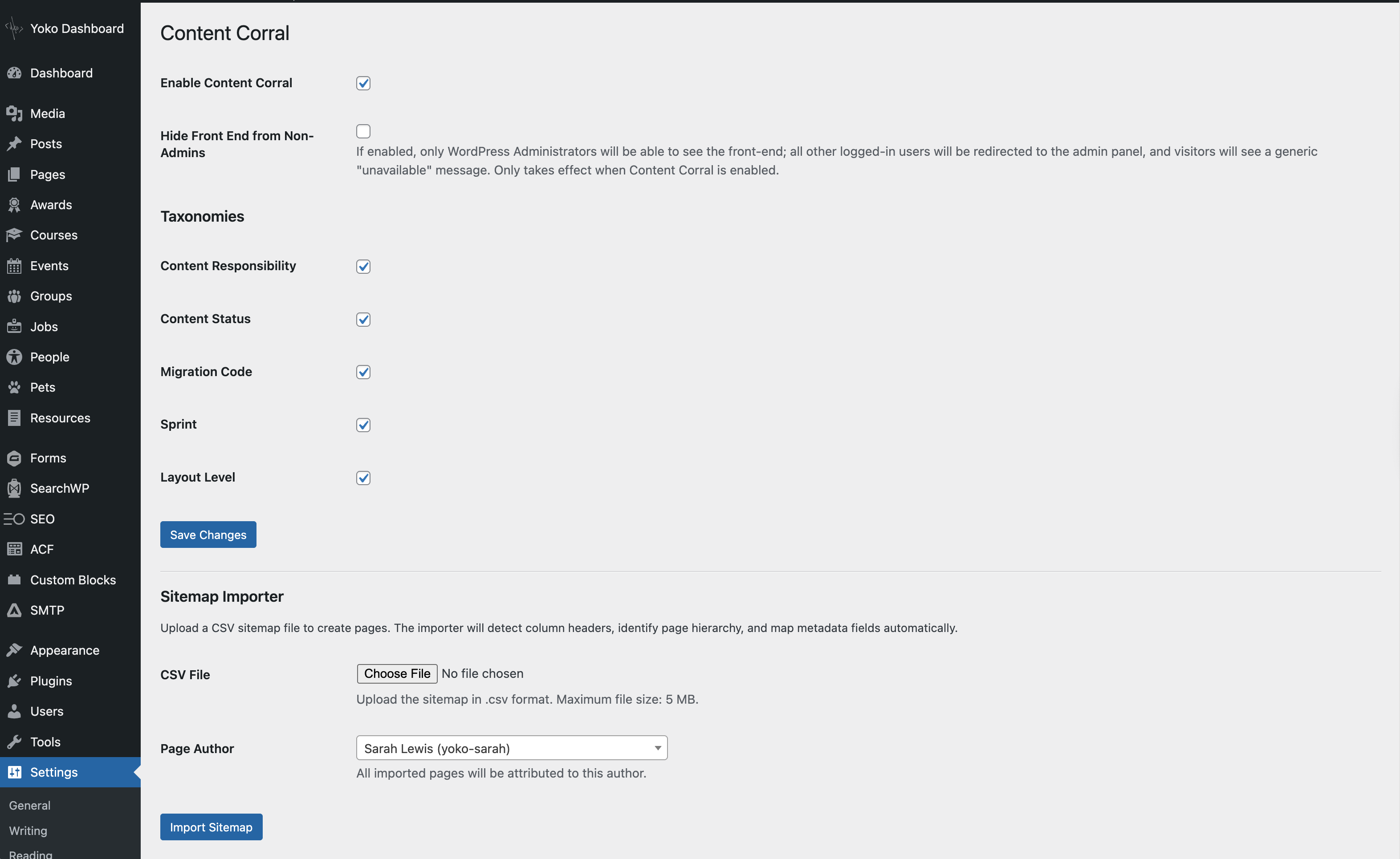
General Settings
| Setting | Description |
|---|---|
| Enable Content Corral | Activates all subsystems (taxonomies, editor, importer, user role) |
| Hide Front End from Non-Admins | Redirects non-admin users to the dashboard. Visitors see a generic "unavailable" message. Only takes effect when Content Corral is enabled. |
Taxonomy Toggles
Each Content Corral taxonomy can be individually enabled or disabled:
| Taxonomy | Purpose |
|---|---|
| Content Responsibility | Track who is responsible for content on each page |
| Content Status | Track the editorial status of each page's content |
| Migration Code | Track migration decisions from content audits |
| Sprint | Group pages into content sprints for phased delivery |
| Layout Level | Define the layout complexity (e.g., high-touch, low-touch) |
All taxonomies are enabled by default. Unchecking a taxonomy prevents it from being registered — it won't appear in the editor or admin columns. Taxonomies can also be managed programmatically via the content_corral_custom_taxonomies filter.
Sitemap Importer
When Content Corral is enabled, the Sitemap Importer section appears below the settings:
- CSV File: Upload a
.csvsitemap file (max 5 MB). The importer validates the file extension, MIME type, and size. - Page Author: Select which WordPress user the imported pages will be attributed to. Uses a searchable dropdown for sites with many users.
CSV Sitemap Importing
The importer uses the CsvParser class to handle the wide variety of spreadsheet formats used in Content Strategy.
How It Works
- Upload a CSV file from the Content Corral settings page
- Header detection — The parser scans the first 30 rows and picks the one with the most matches against ~40 known column patterns
- Column classification — Each column is identified as either a hierarchy column (Parent, Child, Grandchild, Level 1/2/3/4), a known metadata column, or an unknown column
- Unmapped columns — If the parser finds columns it can't classify, a preview screen lets you manually assign them or skip them
- Import — Pages are created in the correct hierarchy with all metadata attached
Supported Column Names
The parser recognizes many naming variations. For example:
| What it matches | Maps to |
|---|---|
| "Parent", "Level 1", "-" | Page hierarchy (top level) |
| "Page (Child)", "Level 2" | Page hierarchy (child) |
| "Content Source", "Content Source URLs", "Content Source (Yoko Co)" | Content source field |
| "Content Status", "Content Sprint" | Taxonomy terms |
| "Migration Code", "Migration Status", "Decision from Content Audit", "Content Verdict" | Migration code taxonomy |
| "Yoko Notes", "Yoko Co Notes", "Yoko Content Notes" | Yoko notes meta field |
| "Client Notes", "Internal Notes" | Internal notes meta field |
For the full list, see CsvParser::$metadata_map in class-csv-parser.php.
Content Source Handling
The "Content Source" column often contains freeform text — URLs, notes, or a mix. The importer handles this intelligently:
| CSV Cell Value | URLs Extracted | Notes |
|---|---|---|
https://example.com/page/ | ['https://example.com/page/'] | — |
New Page | — | New Page |
New Page (hidden for now) | — | New Page (hidden for now) |
https://a.com/ + https://b.com/ | ['https://a.com/', 'https://b.com/'] | — |
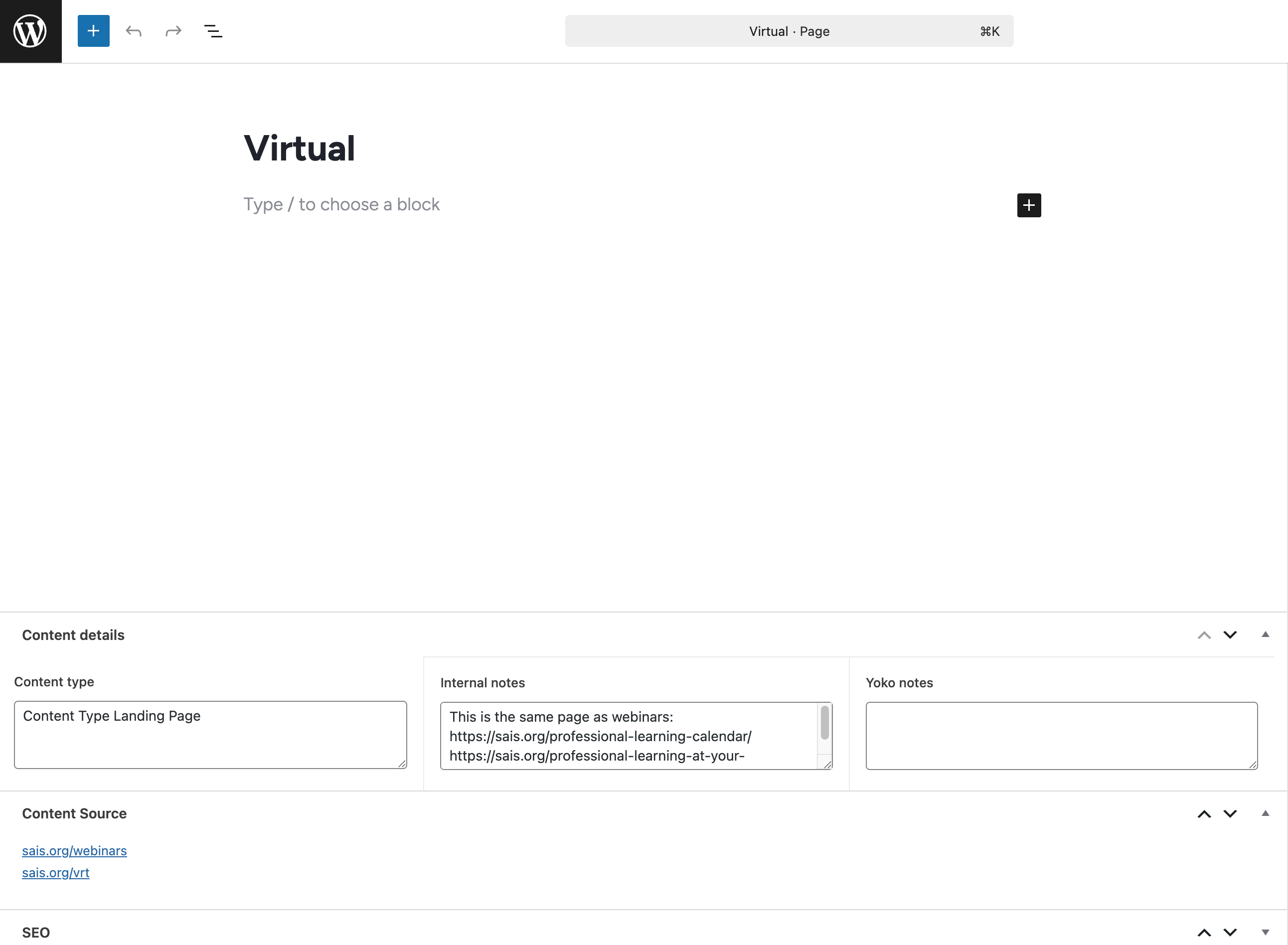
A Content Source meta box appears on the page editor for any page with content source data, showing URLs as clickable links and notes as plain text.
Row Filtering
The parser automatically skips:
- Section markers — Rows with labels like "SUPERNAV", "MAIN NAV", "FOOTER"
- Description rows — Long explanatory text that sometimes appears below headers
- Empty rows — Blank rows used as spacers
- Summary rows — Rows with a label and a count (e.g., "Archive 0")
Content Corral User Role
Content Corral registers a custom content_corral user role with capabilities for editing posts, pages, and taxonomy terms, but without front-end viewing privileges. This role is designed for external content contributors who work in the admin panel but shouldn't see the staging site.
The role is created once when Content Corral is first enabled. To update its capabilities after a change, deactivate and reactivate the plugin.
ACF Fields
Content Corral uses ACF (Advanced Custom Fields) for page-level metadata:
- Content type — Textarea on all pages
- Internal notes — Textarea on all pages
- Yoko notes — Textarea on all pages
- Sprint Details — Date picker on sprint taxonomy terms
These fields are displayed side-by-side at 33% width each to minimize vertical space in the editor. They are registered in acf/field-groups.php and require ACF Pro to be active.
The Content Corral settings page and sitemap importer do not require ACF — they use native WordPress admin pages. ACF is only needed for the page-level metadata fields listed above.
Filters
Content Corral provides several filters for per-site customization. See the Content Corral README for the full filter reference, including:
content_corral_csv_metadata_map— Add column name patterns to the CSV parsercontent_corral_custom_taxonomies— Modify the taxonomy list programmaticallycontent_corral_exclusive_taxonomies— Control which taxonomies use radio buttons vs checkboxescontent_corral_default_terms— Set default taxonomy terms for imported pagescontent_corral_canonical_taxonomy_map— Map CSV columns to taxonomy slugscontent_corral_canonical_field_options— Customize the column mapping dropdowncontent_corral_menu_keep/content_corral_menu_remove— Customize admin menu visibilitycontent_corral_deactivated_plugins— Deactivate plugins for Content Corral users
Key Files
| File | Purpose |
|---|---|
includes/Workflow/ContentCorral.php | Main class, settings page, activation logic |
includes/Workflow/ContentCorral/class-csv-parser.php | CSV parsing with fuzzy header detection |
includes/Workflow/ContentCorral/class-sitemap-importer.php | Import handler, preview UI, content source meta box |
includes/Workflow/ContentCorral/class-taxonomies.php | Taxonomy registration and admin columns |
includes/Workflow/ContentCorral/class-editor.php | Editor CSS and body class customizations |
includes/Workflow/ContentCorral/class-utilities.php | Admin menu simplification for CC users |
includes/Workflow/ContentCorral/class-references.php | Reference image management |
includes/Workflow/ContentCorral/acf/field-groups.php | ACF field group definitions |
includes/Workflow/README.md | Filter reference documentation |