Primary Category
Choose one term as the primary one when a post has several from the same taxonomy — the category a post is really about, rather than the alphabetically first one a template happens to print.
Works on hierarchical taxonomies (Categories and anything category-like). Flat taxonomies such as Tags use a different control and are not part of this.
Both editors write the same post meta, so a post set up in one reads correctly in the other.
Block editor
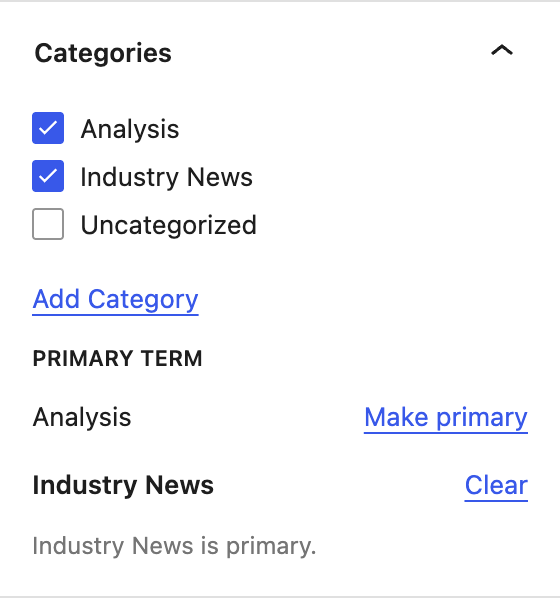
Open the taxonomy's panel in the document sidebar and tick the terms as usual. A Primary term list appears underneath, holding the terms you ticked:
- Click Make primary next to the one you want.
- It goes bold, and the text underneath confirms which term is primary.
- Clear removes the choice without unticking anything.
The list only appears when two or more terms are ticked. With one term there is nothing to choose between — it is already the only candidate.
Classic editor and page builders
Post types served by the classic editor get the original control: hover a ticked term in the checklist and click Make Primary. The chosen term is highlighted in blue and labelled Primary.
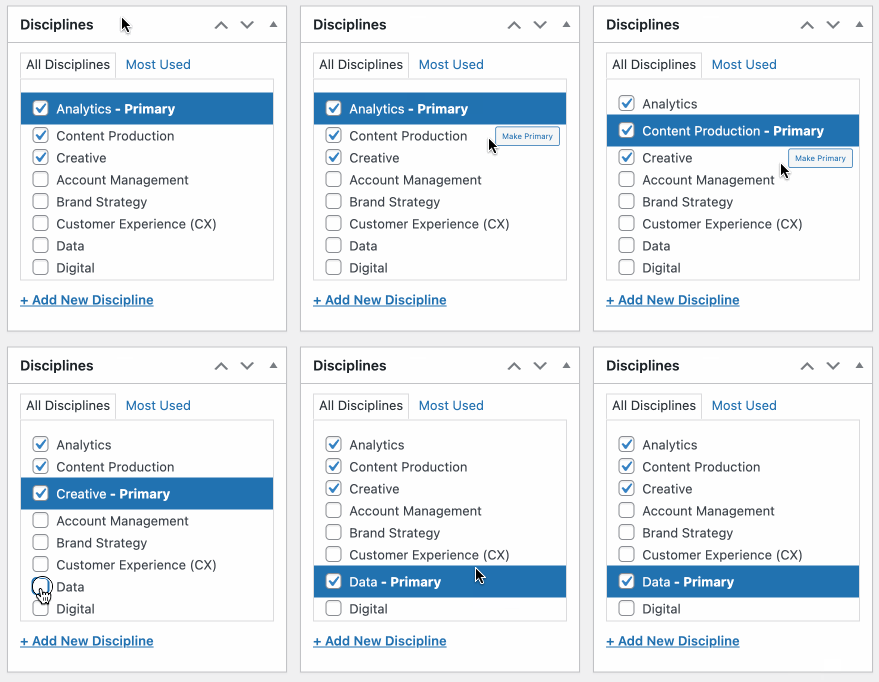
Only ticked terms can be primary, and only one term per taxonomy.
The same as any other per-post control: the block editor gets the sidebar list, the classic editor gets the checklist buttons. Neither is a setting — it follows whichever editor the post type uses.
Taxonomies in the consolidated panel
A taxonomy pulled into the Consolidated Taxonomy Panel does not get a primary term control. Its own panel is hidden, and this control lives inside that panel, so it goes with it.
Nothing is lost by that: a primary term already stored stays stored, keeps working on the front end, and reappears in the editor if the taxonomy is taken back out of the consolidated panel.
If you need a primary term on a taxonomy, leave it its own panel.
Using it on the front end
The core/post-terms block can render the primary term first, or render only the primary term. That is the usual way to put a primary term on a post card or a single template — no template code needed.
Body Classes
Posts that have a primary taxonomy term get a body class in the format
primary-term:[TAXONOMY SLUG]:[TERM SLUG].
The class is only added while the term is still assigned to the post — untick the term and the class goes, without anything having to tidy the stored value up.
For developers
| Post meta | _primary_terms, an array of taxonomy => term ID |
| REST field | yoko_primary_terms on every post type with a hierarchical taxonomy |
| Getter | YokoCo\PrimaryTaxTerm::get_primary_terms( $post_id ) |
| Writer | YokoCo\PrimaryTaxTerm::store( $post_id, $map ) |
| Filter | yoko_primary_term_taxonomies — ( array $taxonomies, string $post_type ) |
get_primary_terms() returns only pairs whose term is still assigned to the
post, so callers never have to check.
_primary_terms is protected meta, and meta only reaches a post type's REST
schema when that type supports custom-fields — which most custom post types do
not. A REST field has no such requirement, so the control works on every post
type rather than only on core Posts and Pages.
Troubleshooting
| Symptom | Likely cause |
|---|---|
| No Primary term list under a checklist | Fewer than two terms are ticked, or the taxonomy is in the consolidated panel. |
| No list on any taxonomy | The taxonomy is flat, not hierarchical. Only category-like taxonomies are offered. |
| The primary term vanished after editing in the block editor | Fixed in 1.29.0. Before that, any save that was not the classic editor's own form — the block editor, WP-CLI, quick edit, a plugin calling wp_update_post() — deleted the stored value. |